Views: 0 Author: Site Editor Publish Time: 2026-07-22 Origin: Site
The holiday is here, and you might want to use this time to recharge—catch up on your major courses, learn programming, practice design, or prepare for competitions in the new semester? But does firing up your old home computer feel like a chore? Does the browser lag, Photoshop crash, or compiling code take ten minutes? Does the frustration instantly dampen your enthusiasm for learning?
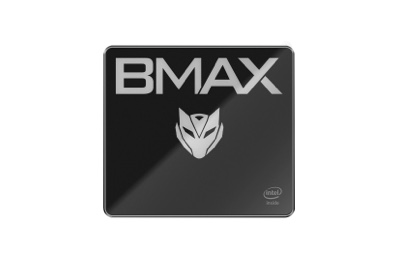
Today, BMAX recommends an AI mini PC designed for efficient learning – the MaxMini B11 Pro. Packed into a palm-sized chassis are the 14th Gen Intel Core Ultra 5 processor and a dedicated NPU delivering powerful AI computing capabilities. From coding and design to online classes and even unwinding with games, this all-in-one device is the ultimate study companion for students.
Modern learning relies heavily on AI assistance: organizing literature frameworks for term papers, generating reference materials for designs, debugging code logic, or processing massive spreadsheets for data analysis. When used effectively, AI tools eliminate repetitive tasks and save significant time, dramatically boosting study efficiency.
The B11 Pro is powered by the Intel Core Ultra 5 115U processor (14th Gen), utilizing a synergistic CPU+GPU+NPU architecture that delivers robust AI deep learning and optimization capabilities. Its built-in dedicated AI engine—the Intel AI Boost NPU—delivers 11 TOPS of computing power, enabling local AI inference without relying on the cloud. This not only saves time on generation tasks but also ensures your privacy—protecting sensitive academic work and research papers from data leaks. When writing reports, outlines can be generated and text polished with a single click; when doing visual assignments, creative reference images can be generated quickly; when processing data, conclusions can be generated through intelligent analysis; and it can even assist in generating video scripts and optimizing editing ideas. Experience rapid, smooth local responsiveness that makes studying effortless and enjoyable.
Studying often involves multitasking—such as streaming a live online class while taking notes in a document, all while keeping reference materials, mind-mapping tools, and practice-test software running in the background. Low-spec computers often lag or crash in these scenarios, disrupting your study flow.
The B11 Pro features hardware configurations tailored for diverse study scenarios:
• Powered by a 14th Gen Intel Core processor (8 cores, 10 threads, turbo frequency up to 4.2GHz), it delivers a 22% performance boost over the previous-generation Core i5-1345UE. It runs professional software smoothly and handles daily tasks—like online classes, practice tests, research, and thesis writing—with ease;
• Equipped with 16GB of high-speed LPDDR5 4400MHz memory, it manages multiple concurrent applications effortlessly; you can have courseware, design software, and programming tools open simultaneously without slowing down;
• Features a 512GB NVMe high-speed SSD for instant app launches and rapid loading of large files, easily accommodating vast libraries of online classes, courseware, and design assets. It also includes an expansion slot for a 2.5-inch drive, allowing for future storage upgrades to securely house four years' worth of university study materials.
Want to unwind with some light gaming during your downtime? The integrated graphics handle it effortlessly. One machine covers both study and entertainment, helping you balance work and play for greater efficiency.
For students who need to consult extensive reference materials or work on design and video editing, constantly switching windows on a single screen is inefficient and disrupts your train of thought. The B11 Pro is equipped with DP, HDMI, and Type-C video ports, supporting triple-screen setups (mirrored or extended modes) with 4K 60Hz resolution and dynamic HDR.
You can stream a detailed online lecture on one screen, take notes in a document on the second, and research literature on the third—eliminating the need to constantly switch windows and effectively doubling your study efficiency. Its integrated Intel graphics feature a maximum dynamic frequency of 1.8GHz and support Intel Deep Learning technology, ensuring smooth performance for photo editing, video cutting, and basic 3D modeling—easily handling the academic demands of media, design, and engineering majors.
Space in student dorms and on bedroom desks is often limited; bulky desktop towers only add to the clutter. The B11 Pro features a mini-chassis design that fits easily in the palm of your hand and supports wall mounting. You can mount it behind your monitor to free up desk space, leaving room for books, stationery, drawing tablets, and other study essentials.
The top cover is designed to be water-resistant, dust-proof, and scratch-resistant, ensuring maximum durability and peace of mind against accidental spills, dust accumulation, or bumps.
Don't let its small size fool you—its thermal management is top-notch. It features a proprietary Space Capsule cooling system combining dual copper heat pipes with a smart turbo fan. Coupled with a scientifically engineered top-cover air intake and efficient ventilation, it allows for full-throttle 40W performance. Even when running code or rendering videos for extended periods, it won't throttle or stutter, quietly keeping you company as you study late into the night.
No matter the study requirement, its rich array of ports and connectivity options has you covered:
High-speed Wi-Fi 6: Three times faster than Wi-Fi 5 with latency as low as 10ms, ensuring stable, lag-free online classes, cloud-based training, and online exams. Bluetooth 5.2 support makes connecting wireless headphones, keyboards, and mice hassle-free.
Versatile Ports: Equipped with USB 3.2, USB 2.0, a 2.5G Ethernet port, and a headphone jack, it connects directly to peripherals like drawing tablets, printers, and projectors—making screen sharing for group projects, printing papers, and digital art creation convenient.
Dual System Support: Supports both Windows 11 Pro and Linux (Ubuntu). Use Windows for daily study and office tasks, and switch to Linux for programming, development, and AI training—all with ease. One device meets all your learning needs without the hassle of extra equipment.
School breaks are the perfect time to get ahead of the pack, and having the right equipment makes all the difference in your studies.
With its ultra-compact design, powerful performance, and AI optimization capabilities, the BMAX MaxMini B11 Pro easily meets the diverse needs of students at all levels. Moreover, its price is lower than similar products on the market, making it a rare and cost-effective choice for students.
This holiday, bring the B11 Pro home, arm yourself up, and then quietly amaze everyone when school starts, experiencing the joy of rapid improvement!