Views: 0 Author: Site Editor Publish Time: 2026-01-20 Origin: Site
Choosing the right laptop can feel like a daunting task. With so many different models, configurations, and specifications available, it's easy to get overwhelmed. Whether you're a student, a professional, or someone who simply needs a reliable device for day-to-day tasks, understanding what you need and how to match those requirements with the right laptop can save you time and money.
At www.bmaxit.com, we understand that choosing a laptop is a big decision, and we're here to guide you through the process. In this article, we will break down the key factors to consider when picking a laptop that's perfect for you. By the end of this guide, you'll have a clear understanding of how to choose a laptop based on your specific needs, preferences, and budget.
Before you begin browsing through the endless list of laptops, there are a few critical factors to consider. These factors will help you identify the right laptop that matches your needs, whether it's for work, study, or entertainment.
The first and most important question to ask is: What will I use my laptop for? Understanding how you plan to use your laptop is crucial because it will help you determine the specifications you need.
For Basic Use: If you're just browsing the web, checking emails, or using word processing software, you don't need an overly powerful laptop. Look for something with a basic processor (like an Intel N95, N100 or N150 Processor), 12GB of RAM, and 512GB storage for faster boot times.
For Work/Professional Use: If you plan to use your laptop for business, working with documents, spreadsheets, presentations, and light photo editing, you should focus on a laptop with a mid-range processor (Intel Core i3, Core i5 or Ultra 5), 16GB or more of RAM, and 512GB SSD storage.
For Gaming or Heavy Use: If you're a gamer or need a laptop for tasks like video editing, 3D modeling, or running demanding software, you'll need a high-end processor (Intel Core i7, Ultra 7, Core i9 or AMD Ryzen 7), 24GB to 32GB of RAM, and 1TB NVMe SSD.
Your budget will play a significant role in determining the laptop you choose. Affordable laptops offer great value for everyday tasks, but if you need more power for work or gaming, you may need to stretch your budget.
Under $500: You can find budget laptops that are suitable for basic tasks such as web browsing, word processing, and watching videos. These usually come with lower-end processors (Intel N95,N100 or N150), 12GB of RAM, and 512GB SSD storage.
$500 to $1,000: Mid-range laptops in this category typically have Intel Core i3, Core i5 or Ultra 5 processors, 16GB of RAM, and 512GB SSD storage. These are ideal for professionals who need more performance without going over budget.
Above $1,000: High-end laptops with Intel Core i7, Ultra 7, Core i9 or AMD Ryzen 7, 32GB of RAM, 1TB SSD Storage, and dedicated graphics cards are available in this range. These laptops are designed for users who need superior performance for gaming, content creation, or professional-grade tasks.
Once you've defined the purpose and budget, the next step is to focus on the laptop's specifications. Let's break down the most important components you should pay attention to when choosing a laptop.
The processor is the heart of any laptop, and it plays a key role in determining the overall speed and performance of your device. Here are some options based on your needs:
Processor Type | Best For |
Intel Processor N-series | Basic tasks like browsing, word processing |
Intel Core i3/ Core i5/ Ultra 5 | General productivity, light multitasking, and media consumption |
Intel Core i7/Ultra 7/Core i9/AMD Ryzen 7 | Heavy multitasking, gaming, video editing, and other demanding tasks |
For most users, 16GB of RAM is the sweet spot for a balance between performance and price. However, if you plan to run multiple applications simultaneously, or if you need a laptop for gaming or creative work, you may want to consider 24GB to 32GB.
RAM Size | Best For |
12GB | Basic tasks like web browsing and document editing |
16GB | General use, light multitasking, and streaming |
24GB to 32GB | Gaming, video editing, and heavy multitasking |
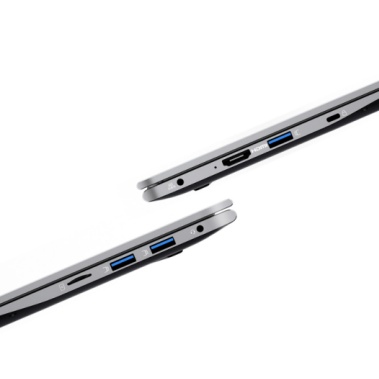
When it comes to choosing the right storage for your laptop, both SATA SSD and NVMe SSD deliver fast and reliable solid-state performance. Since all of our laptops are equipped with SSD storage, the key difference lies in the type of SSD technology used — SATA or NVMe.
Both SATA SSD and NVMe SSD offer significantly faster performance compared to traditional mechanical drives, ensuring quick boot times and responsive system operation.
A SATA SSD provides stable and efficient performance for everyday computing tasks such as web browsing, document editing, video streaming, and general office work.
An NVMe SSD, however, utilizes the PCIe interface, enabling much higher data transfer speeds and lower latency. This means faster system boot-up, quicker application loading, and dramatically improved file transfer speeds — especially when working with large files or demanding software.
The enhanced speed of NVMe SSD makes a noticeable difference in overall system performance, particularly when running multiple applications or handling intensive workloads.
Both SATA SSD and NVMe SSD have no moving parts, making them more durable and less prone to failure from physical impact. This solid-state design ensures greater reliability, especially for users who frequently carry their laptops or work in dynamic environments.
Both types of SSD are energy-efficient and contribute to improved battery life. While NVMe SSD may consume slightly more power under heavy workloads due to its higher performance capabilities, overall efficiency remains excellent for everyday use.
For users who need a laptop for work, school, or travel, both SATA and NVMe SSD options provide dependable performance with strong energy efficiency.
512GB SSD: This is often sufficient for basic tasks and light usage, such as web browsing, documents or PPT processing, online course learning, videos watching and email
1TB SSD: These capacities are ideal for most users who need better performance and more storage for files, software, and apps. If you work with large files (such as videos or graphics), or if you enjoy gaming, a 1TB SSD will offer the space and speed you need without compromising on performance.
Overall, choosing an SSD over an HDD offers far greater benefits in terms of speed, durability, and energy efficiency, making it the preferred choice for most users.
Laptops now come in a variety of display options. Here are some things to keep in mind:
Resolution: Look for a 1080p Full HD display for clear images and sharp text.
Size: Laptop screens range from 11 inches to 17 inches, with 15.6 inches being the most common size for a balance of portability and screen real estate.
Battery life is one of the most important considerations, especially for people who need a laptop that can last all day without charging. A good rule of thumb is to look for laptops that offer 6–8 hours of battery life. If you need longer battery life, consider laptops designed for longer usage, which can go up to 10-12 hours on a single charge.
Choosing the right laptop doesn’t have to be overwhelming. By understanding your specific needs, defining your budget, and focusing on the key specifications that matter most, you can select the perfect laptop that suits your lifestyle. Whether you need a basic laptop for everyday use, a high-performance machine for work, or a gaming laptop with powerful graphics, there are affordable options for every need.
At www.bmaxit.com, we are committed to providing a range of laptops that offer reliable performance, excellent value, and tailored solutions for all types of users. If you’re ready to discover more or need expert guidance, we invite you to contact us for personalized recommendations and advice on the best laptop for your needs.
The Intel Core i7 is more powerful and better suited for tasks like gaming, video editing, and heavy multitasking, while the Intel Core i5 is sufficient for everyday tasks, office work, and moderate multitasking.
For most general tasks like web browsing, document editing, and media consumption, 12GB of RAM is sufficient. However, if you plan on doing more intensive work like gaming or content creation, 16GB of RAM or more might be necessary.
NVMe SSD offers significantly higher data transfer speeds and lower latency compared to SATA SSD because it uses the PCIe interface instead of the traditional SATA interface. This results in faster boot times, quicker application loading, and improved performance when transferring large files or running demanding software.
While SATA SSD provides reliable and efficient performance for everyday tasks, NVMe SSD delivers superior speed and responsiveness, making it ideal for gaming, content creation, and multitasking-heavy workloads.
Ideally, a good laptop should last between 6 to 8 hours on a single charge. Some models, especially those designed for extended use, can last up to 10-12 hours depending on usage.