Views: 0 Author: Site Editor Publish Time: 2026-01-07 Origin: Site
In recent years, mini PCs have gained significant popularity as compact alternatives to traditional desktop computers. These small-form-factor devices pack considerable power into a tiny box, providing a space-saving solution without sacrificing too much in terms of performance. However, many people wonder: Is a mini PC really as good as a normal PC?
The answer is not a simple yes or no; it depends on your needs, how you plan to use the computer, and what you expect from it. While traditional PCs are known for their powerful components, greater upgradability, and versatility, mini PCs have evolved to the point where they can offer similar capabilities, albeit with some trade-offs. At www.bmaxit.com, we understand the importance of choosing the right device for your specific needs, and we are here to guide you through the comparison between mini PCs and traditional desktop PCs.
This article will delve into the key differences between a mini PC and a normal PC, examining factors such as performance, space efficiency, upgradeability, and cost-effectiveness. Whether you're a gamer, a professional, or just someone looking for a compact home computer, understanding these differences will help you make an informed decision.
A mini PC is a small, compact computer that typically includes all the essential components of a regular desktop PC, such as a processor (CPU), memory (RAM), storage, and ports. These compact devices are designed to offer high performance while occupying minimal space. Despite their size, mini PCs can handle a wide range of computing tasks, from office work to media consumption and even light gaming.
Mini PCs are often used in environments where space is limited, such as small offices, apartments, or home theater setups. Their small size also makes them highly portable, and many come with wireless connectivity options, enabling easy integration into various setups.
When comparing mini PCs to traditional desktop PCs, there are several factors to consider. Below, we'll break down the key differences that could influence your decision.
Feature | Mini PC | Normal PC |
Size | Compact and portable | Larger, takes up more space |
Performance | Suitable for light to moderate tasks, some can handle high-performance needs | High performance, ideal for demanding applications |
Upgradability | Limited upgrade options | Extensive upgrade possibilities |
Price | More affordable | Generally more expensive |
Energy Consumption | Lower energy usage | Higher energy consumption |
Cooling | Passive cooling or small fan systems | Advanced cooling systems |
One of the most significant factors in determining if a mini PC can be as good as a normal PC is its performance. Traditional desktop PCs are often equipped with powerful processors, large amounts of RAM, and high-end graphics cards. Mini PCs, on the other hand, are designed to offer similar performance in a more compact and energy-efficient form.
Most mini PCs use processors from well-known brands like Intel and AMD. While high-end mini PCs come with powerful processors like Intel Core i7 or i9, normal desktop PCs can be equipped with even more advanced CPUs, often offering more cores and threads for demanding applications.
Mini PCs are capable of handling everyday tasks such as word processing, web browsing, and media streaming with ease. However, for tasks like video editing, 3D rendering, or high-end gaming, a traditional desktop PC with a dedicated graphics card may be a better option.
Mini PCs typically come with 6GB to 32GB of RAM, which is sufficient for most general computing tasks. However, compared to normal PCs, mini PCs might have less RAM or non-expandable RAM options. For users who require more memory for heavy multitasking or running memory-intensive applications, a traditional PC might be more suitable.
As for storage, mini PCs often come with SSDs for faster performance, which is an advantage over traditional desktop hard drives. Some mini PCs also offer the option to add an external hard drive or connect to cloud storage for extra space.
While mini PCs often come with integrated graphics, they are generally not powerful enough for high-end gaming or video editing. For light gaming and media consumption, integrated graphics are sufficient. However, normal desktop PCs can be equipped with dedicated GPUs, making them the preferred choice for gamers and creative professionals who need robust graphical performance.
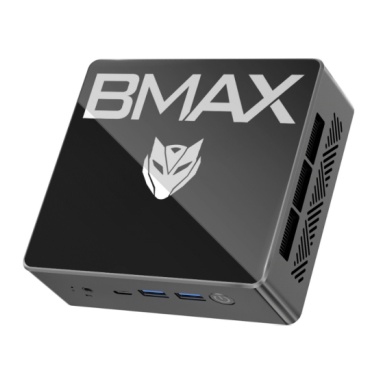
Space Efficiency
Mini PCs are extremely compact and portable. They save space and can fit into tight areas, making them ideal for small offices, apartments, or even home entertainment setups. This is a significant advantage over traditional PCs, which tend to take up more desk or floor space.
Energy Efficiency
Mini PCs are designed to be energy-efficient, consuming less power than traditional desktop computers. This makes them a good option for those looking to save on electricity bills while still getting the computing power they need.
Affordability
Mini PCs are typically more affordable than traditional desktop PCs. While you may sacrifice some high-end features and expandability, mini PCs can be a great option for users who need basic functionality at a lower cost.
Portability
Thanks to their small size, mini PCs are highly portable. Whether you’re traveling or need to move your computer between rooms, the compact design makes it easy to carry and set up quickly.
Limited Upgradability
One of the biggest drawbacks of a mini PC is its limited upgradeability. Unlike traditional desktop PCs, which allow you to swap out parts like the GPU, RAM, or storage, mini PCs often have fixed components that cannot be easily upgraded. This means that if you want to increase performance in the future, you may need to buy a new unit altogether.
Reduced Performance for Intensive Tasks
While mini PCs can handle everyday tasks, they may struggle with more demanding applications like gaming, video editing, or 3D modeling. Traditional PCs have the advantage of being able to handle higher-end components, such as dedicated graphics cards, which mini PCs often lack.
Cooling and Heat Management
Due to the compact size of mini PCs, heat management can be a challenge. Some mini PCs rely on passive cooling, which can lead to overheating if the system is under heavy load. Traditional PCs, on the other hand, are equipped with more advanced cooling systems to handle demanding tasks without overheating.
When it comes to gaming, traditional desktop PCs are still the go-to choice for serious gamers. Normal PCs can be equipped with high-end processors and dedicated graphics cards, providing smooth gameplay for AAA titles. Mini PCs, however, are generally not designed for gaming, especially high-performance gaming. They may struggle to run graphically intensive games at high settings, although they can handle lighter games with ease.
So, is a mini PC as good as a normal PC?The answer depends on your specific needs and how you intend to use your computer. Traditional desktop PCs offer strong performance and greater hardware expandability, making them suitable for highly demanding tasks such as advanced gaming, video editing, or intensive multitasking.
However, for general computing tasks, light gaming, and media consumption, a mini PC provides a compact, energy-efficient, and cost-effective solution that delivers excellent performance while saving space. For many users, this balance of performance and practicality makes a mini PC the smarter choice.
At www.bmaxit.com, we understand that choosing the right PC is essential for both personal and professional use. Our mini PCs offer high performance in a small, portable package, perfect for a variety of applications. Whether you’re looking for a mini PC for home office work or a lightweight solution for light gaming, we have a range of options that cater to your needs. If you’re interested in learning more or want personalized recommendations, our team is here to help guide you toward the best solution for your computing needs.
What’s the main difference between a mini PC and a normal PC?
Mini PCs are compact, energy-efficient, and affordable, while traditional PCs are larger, more powerful, and offer greater upgradeability and performance.
Can a mini PC handle gaming?
Mini PCs can handle light gaming, but for high-performance gaming, a traditional PC with a dedicated GPU is recommended.
Is it easy to upgrade a mini PC?
Mini PCs have limited upgrade options, with some components being fixed. This makes them less flexible than traditional PCs for future upgrades.
What is the main advantage of using a mini PC?
The main advantage of a mini PC is its space-saving design, making it ideal for environments with limited space while still providing efficient performance.