Views: 0 Author: Site Editor Publish Time: 2026-07-07 Origin: Site
As AI permeates every aspect of work, creativity, and entertainment, features like local AI inference, intelligent content creation, and real-time data analysis have evolved from mere novelties into essential capabilities. Older computers that lack dedicated AI processing power—relying solely on the CPU—are falling behind in terms of computing power, efficiency, and user experience; their obsolescence is inevitable. Some might argue that while older PCs may lack raw power, they can still handle basic AI generation tasks. However, this illusion of "barely usable" can easily make people overlook the high costs behind it. Let BMAX break it down for you.
If you are still making do with an aging desktop or laptop, you face more than just occasional lag; you are dealing with a significant efficiency gap that leaves you out of step with the times:
Traditional PCs rely on the CPU alone to handle tasks like AI writing, smart image cutout, and AI video noise reduction. This often leads to sluggish performance and overheating, and can even prevent large-scale AI tools from launching. Furthermore, relying on cloud-based AI for content generation is not only constrained by internet speeds but also poses privacy risks regarding the leakage of sensitive data.
Traditional PCs often utilize slower DDR4 memory and SATA SSDs. This configuration leads to frequent crashes when multitasking—such as running multiple web pages, spreadsheets, and design applications simultaneously. Loading large assets or launching heavy software takes ages, with every moment of waiting dragging down your productivity.
Under heavy workloads, these machines heat up rapidly and automatically throttle performance (downclocking), causing stuttering or crashes during rendering and complex calculations. Older laptops, in particular, become uncomfortably hot and suffer from piercing fan noise; battery life also degrades significantly, resulting in a poor mobile working experience.
Old desktop PCs are bulky and lack sufficient ports, failing to support multi-monitor setups or the connection of multiple peripherals; meanwhile, aging laptops suffer from poor display quality, short battery life, and subpar keyboard feel, significantly compromising both daily productivity and multimedia experiences.
As AI capabilities become a baseline requirement for modern devices, the shortcomings of older computers will only become more pronounced. What you consider "barely enough" actually brings you more meaningless consumption, causing you to pay higher costs in terms of time and efficiency. Upgrading at the right moment—and making a genuine AI PC your indispensable partner—is the optimal solution to resolve all these pain points.
BMAX’s recently launched B11 Pro mini PC and X17 Turbo laptop are exceptional AI PCs that combine portability, powerful performance, and efficient thermal management. Both feature a synergistic CPU+GPU+NPU architecture designed for diverse scenarios—ranging from office work and business travel to home entertainment—effortlessly ushering you into a new era of AI-driven productivity.
Both BMAX AI PCs are equipped with Intel 14th generation Core Ultra 5 processors, adopting a new CPU+GPU+NPU three-core heterogeneous architecture, achieving a generational leap over traditional computers from the underlying computing power.
Built using the advanced Intel 4 lithography process, this CPU features an 8-core, 10-thread configuration with a maximum turbo frequency of 4.2GHz, balancing high performance with low power consumption. It achieves a PassMark score of 11,689—a 22% performance increase over the Core i5-1345UE—handling daily office tasks, professional content creation, and gaming with ease. Crucially, it supports Intel’s deep learning technologies and offers robust AI optimization capabilities, serving as a brilliant, high-performance "brain."
Equipped with the Intel AI Boost NPU, it delivers hardware-level AI acceleration. With a computing power of 11 TOPS, it supports sparse computing, improves local text-to-image generation speed by 4 times, reduces power consumption of AI special effects in video conferencing by 38%, and can smoothly run dozens of AI tools such as AI writing, AI drawing, AI video creation, and AI data analysis. It can run locally without an internet connection, ensuring better data privacy and superior response speed.
This integrated GPU is based on Intel’s Xe architecture and features a maximum dynamic frequency of 1.8GHz. Supporting Intel deep learning technologies and dynamic HDR, it accelerates graphics processing for AI creation while delivering a smooth, high-definition audiovisual and gaming experience.
To fully leverage powerful AI optimization capabilities, exceptional read and write speeds are essential. Consequently, both models deliver top-tier performance in terms of memory and storage. They are equipped with 16GB of high-speed LPDDR5 memory and a 512GB NVMe SSD. Compared to LPDDR4, memory read speeds have increased by 39.6% and write speeds by 34.2%, ensuring smooth, lag-free multitasking across multiple applications. Meanwhile, the NVMe SSD offers read speeds 661.9% faster and write speeds 500% faster than SATA 3.0, enabling instant system boot-ups and rapid file loading—effectively eliminating lag—while also meeting the need for massive file storage.
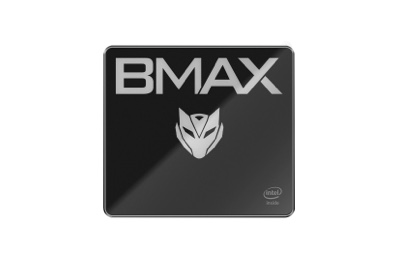
If you need a high-performance desktop device with extensive expandability for a fixed workstation, the MaxMini B11 Pro mini PC is the ideal choice. It packs the full performance capabilities of a standard desktop into a compact chassis.
To tackle the thermal challenges inherent in mini PCs, BMAX developed the proprietary "Space Capsule" cooling system. It features oversized dual copper heat pipes and a high-performance smart turbo fan. Combined with a top-cover air intake and comprehensive, high-efficiency ventilation, it creates an excellent thermal circulation loop. This allows for stable operation at a sustained 40W power draw—delivering a 15%–25% performance boost over standard cooling solutions. Whether handling prolonged AI computations, video rendering, or unattended gaming sessions, the system remains cool and quiet, eliminating concerns about thermal throttling or performance drops due to overheating.
The B11 Pro is equipped with DP, HDMI 2.1, and Type-C video output ports, supporting simultaneous display across three screens (in either mirrored or extended modes). Each output supports up to 4K resolution at 60Hz with dynamic HDR, making it perfect for split-screen multitasking, multi-monitor design workflows, or home theater setups.
It offers a comprehensive array of ports: USB 3.2 (x2), USB 2.0 (x2), a 2.5G LAN port, a headphone jack, and a 2.5-inch drive bay. You can simultaneously connect peripherals such as keyboards, projectors, 3D printers, and multiple monitors. An additional expansion slot allows for easy storage upgrades to meet higher capacity needs. It supports Wi-Fi 6 and Bluetooth 5.2 for fast, stable network and peripheral connections. Additionally, it supports dual-booting Windows 11 Pro and Linux (Ubuntu), making it an excellent fit for both developers and business professionals.
The top cover features a "tri-proof" design—water-resistant, dust-resistant, and scratch-resistant. You won't need to worry about accidental spills, dusty environments, or minor bumps and knocks; the device retains its sleek, attractive appearance even after long-term use. Features a built-in smart restore function; in the event of a system crash or software failure, the system can be restored to factory settings with simple operations—no professional IT support required, making maintenance easy even for beginners.
Powered by high-performance integrated graphics, mainstream online games run smoothly: League of Legends (120± FPS), CS2(97 FPS), VALORANT (105± FPS), and World of Warcraft (160± FPS)—letting you fully enjoy an exhilarating gaming experience during your downtime.
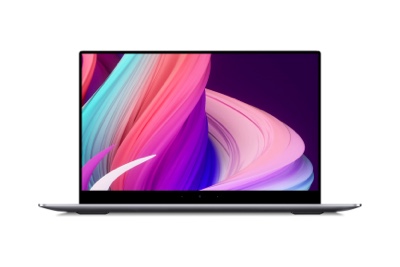
For users who travel frequently, work remotely, or create content on the move, the MaxBook X17 Turbo laptop is the perfect companion. It seamlessly blends a slim, portable design with AI computing power, ensuring high productivity is always within reach.
Crafted with a metal chassis and featuring clean, refined lines, the laptop weighs just 1.7kg and measures 19mm in thickness, making it effortless to carry. The screen supports a 180° hinge, allowing for optimal viewing angles during meetings and collaborative presentations—perfect for diverse work environments.
It features a spacious 15.6-inch IPS Full HD display (1920×1080 resolution) with a 6.5mm narrow bezel and a 178° wide viewing angle. The visuals are crisp and detailed with accurate color reproduction, offering an excellent experience for everything from professional work and creative projects to media consumption.
The full-sized backlit keyboard features ergonomically contoured keycaps, ensuring efficient and comfortable typing even in low-light conditions. A large touchpad supports multi-finger gestures—such as two-finger scrolling, pinch-to-zoom, and three-finger task previews—providing responsive control even without a mouse.
A high-capacity battery provides 9–10 hours of runtime, easily handling a full day of work without the need to constantly hunt for power outlets. Support for Wi-Fi 6 and Bluetooth 5.4 ensures stable, lag-free wireless connectivity. Dual-channel speakers deliver immersive 3D surround sound, enhancing video conferences, online classes, and entertainment alike.
The X17 Turbo utilizes an efficient copper-pipe cooling system and a smart, quiet fan, ensuring cool and silent operation even during heavy workloads or intensive computing tasks. The device is equipped with a full-function Type-C port, three USB 3.2 ports, HDMI, a Micro SD card slot, and a headphone jack. Connect external monitors, USB drives, projectors, or memory cards directly without adapters, making office expansion and connectivity effortless. In addition, dual M.2 SSD slots are provided, allowing users to expand storage capacity as needed and easily accommodate vast amounts of media and files. The device comes pre-installed with Windows 11 Pro and supports a smart recovery function, enabling one-click resolution of system issues for greater peace of mind in a business setting.
The shift from traditional PCs to AI PCs is a clear industry trend. Over the next five to ten years, AI PCs—featuring powerful local computing capabilities, enhanced data security, and continuous learning—will become the mainstream choice for work and creative endeavors.
Whether you need a high-performance desktop setup for a fixed workspace or mobile productivity on the go, BMAX’s two 14th Gen Core AI PCs are perfectly suited to your needs. Why put up with the lag, inefficiency, and lackluster experience of an aging computer? Upgrade now to accelerate your workflow with AI and embrace a new, highly efficient lifestyle!