Views: 0 Author: Site Editor Publish Time: 2026-01-12 Origin: Site
In recent years, mini PCs have gained significant popularity due to their compact size, powerful capabilities, and versatility. Whether you’re setting up a home office, upgrading your workstation, or looking for a space-saving solution, mini PCs can be a game-changer. These devices offer a wealth of benefits, from low energy consumption to portability, and are perfect for those who need reliable computing power without the bulk of traditional desktops.
However, with so many mini PC options on the market, choosing the right one can be overwhelming. What factors should you consider to ensure you’re getting the best value for your investment? This blog will guide you through the essential aspects to look for when buying a mini PC, helping you make an informed decision that meets your specific needs. From performance and connectivity options to size and cooling, we’ll cover the most important features to keep in mind before purchasing.
The performance of a mini PC is one of the most important considerations. While these devices are small, many are equipped with powerful processors that can handle a wide range of tasks. Whether you need a PC for basic office work or more demanding applications such as video editing or gaming, selecting the right processor is essential.
Mini PCs typically come with either Intel or AMD processors. Intel N series processor, Intel Core i3, i5 or AMD Ryzen 5 chips are common for general use, offering a good balance of speed and power. For more intensive tasks, you might opt for an Intel Core i7, i9, Ultra 7 or an AMD Ryzen 7 processor, which provide enhanced performance for multitasking, creative work, and even gaming.
It’s also important to consider the RAM capacity of the mini PC. For basic tasks, 6GB to 8GB of RAM may suffice, but for a smooth experience with multiple applications running simultaneously, aim for at least 12GB of RAM. For professional use or more resource-demanding software, you may need 16GB or even 32GB of RAM.
Another crucial aspect when choosing a mini PC is the storage type and capacity. All of our mini PCs are equipped with solid-state drives (SSDs), and the main difference lies in the type of SSD used: SATA SSD or NVMe SSD.
SATA SSD: Offers reliable and stable performance with faster data access compared to traditional mechanical drives. SATA SSDs provide quick boot times and smooth operation for everyday tasks such as office work, web browsing, and media playback. They are a practical and cost-effective solution for general use.
NVMe SSD: NVMe SSDs use the PCIe interface, delivering significantly higher data transfer speeds and lower latency than SATA SSDs. This results in faster system startup, quicker file transfers, and improved responsiveness when running demanding applications or multitasking.
For optimal performance, consider mini PCs with at least a 256GB SSD. If you prioritize maximum speed and performance, choosing a model with an NVMe SSD is the better option.
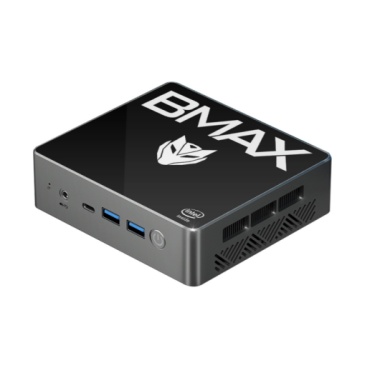
Mini PCs are designed to save space, but their size can vary greatly depending on the model. The key consideration here is whether you want a device that can fit seamlessly in a small workspace or one that offers more powerful features, which may require a slightly larger footprint.
Some mini PCs are designed to be ultra-compact and lightweight, ideal for portability or use in tight spaces. Others offer a more robust design with additional ports, better cooling systems, and higher performance capabilities. If you plan to use the mini PC as a home theater PC (HTPC) or in a commercial setting, you may want to look for models that have a sleek, professional design.
The number and variety of connectivity options are key factors when selecting a mini PC. Look for devices that offer sufficient ports for your needs, including USB 3.0 or 3.1 ports, HDMI, Ethernet, and audio jacks.
USB Ports: USB 3.0 or 3.2 ports are essential for fast data transfer. Consider how many devices you plan to connect to the mini PC. If you need multiple external drives, a model with several USB ports is a must.
HDMI Output: If you plan to connect the mini PC to a monitor or TV, make sure the mini PC has HDMI output. Some models even support 4K output for higher-resolution displays.
Ethernet and Wi-Fi: For stable internet access, ensure that the mini PC has an Ethernet port for wired connections. Many mini PCs also come with Wi-Fi capabilities, making it easier to connect wirelessly.
For more demanding users, you may want to consider a mini PC with Bluetooth of higher edition support, which allows for faster pairing with wireless devices like keyboards, mice, and speakers.
One of the most important aspects to consider when purchasing a mini PC is its cooling system. Due to their compact size, mini PCs face inherent challenges in heat dissipation, which could lead to overheating if not properly managed. Overheating is a significant concern, especially when the device is being used for extended periods or is tasked with resource-heavy applications such as gaming, video editing, or 3D rendering.
To avoid performance throttling and potential damage to the internal components, it's crucial to choose a mini PC with an effective cooling system. There are two main types of cooling mechanisms used in mini PCs: passive cooling and active cooling.
Passive Cooling: Passive cooling systems rely on heat sinks and the natural flow of air to dissipate heat. These systems don’t have fans, making them virtually silent and very energy-efficient. They are ideal for lighter tasks such as browsing, word processing, or media consumption, where the CPU usage remains low. Passive cooling is typically found in ultra-compact mini PCs and is best suited for environments where noise is a concern, such as home offices or living rooms.
Active Cooling: For users who plan to run more demanding applications or use the mini PC for tasks like gaming or heavy multitasking, active cooling is recommended. Active cooling systems come with fans to ensure efficient heat dissipation during high workloads. These systems maintain a lower temperature even under load, which helps prevent thermal throttling and allows the PC to maintain peak performance for longer periods. While active cooling systems can produce some noise, they are much more efficient in keeping the components cool and stable during resource-heavy operations.
It's essential to check the cooling system of the mini PC you're considering, especially if you expect to use it for demanding applications. Look for reviews and benchmarks to see how the system handles heat management in real-world usage scenarios.
Most mini PCs currently come pre-installed with Windows 11. The choice of operating system is crucial, as it affects the software you can run and your overall user experience.
For business and professional use, choosing a mini PC equipped with Windows 11 is a reliable option, as it supports a wide range of software and productivity tools. For users who prefer an open-source environment or require a secure and customizable system for specific tasks, selecting a mini PC that supports both Windows and Ubuntu dual systems can be a smart choice.
A dual-system configuration allows users to switch between Windows and Ubuntu based on their needs. This provides greater flexibility, broader software compatibility, and a more versatile working environment, especially for developers, IT professionals, and advanced users.
when buying a mini PC, it's important to take a comprehensive approach by considering factors such as performance, storage, size, connectivity, and cooling. Whether you're using the mini PC for everyday tasks or more specialized work, selecting the right model will ensure that you get the most out of your investment. As mini PCs become more powerful and affordable, they're increasingly becoming the ideal solution for businesses, home offices, and personal use.
If you're looking for a high-quality mini PC that fits your needs, consider checking out the offerings from BMAX. With a range of models designed for different requirements, www.bmaxit.com provides reliable and affordable mini PCs that offer great value for money. Explore their website to find out more about the various options available and see how a mini PC can transform your workspace.
1. What is the difference between SATA SSD and NVMe SSD in a mini PC?
A SATA SSD provides reliable and stable performance for everyday tasks, offering fast boot times and smooth system operation. An NVMe SSD uses the PCIe interface to deliver significantly higher data transfer speeds and lower latency, resulting in faster file transfers and better performance for demanding applications.
2. Can I upgrade the RAM or storage in a mini PC?
Many mini PCs allow for upgrades to RAM and storage, but you should check the specifications of the model you're interested in to confirm.
3. How much RAM do I need for a mini PC?
For general tasks, 6GB to 8GB of RAM is usually sufficient. However, for more intensive tasks like gaming or video editing, consider 16GB or more.
4. Are mini PCs suitable for gaming?
Yes, many mini PCs are equipped with powerful processors and integrated graphics capabilities that can handle light to moderate gaming. For an excellent gaming experience, choose a mini PC equipped with a high-end processor and graphics card.