Views: 0 Author: Site Editor Publish Time: 2026-08-10 Origin: Site
Replacing bulky office towers sounds incredibly appealing today. You reclaim valuable desk space instantly. You also slash initial hardware budgets significantly. Modern companies desire sleeker, quieter workspace environments. This shifting trend pushes ultra-budget hardware directly into the commercial spotlight. Enter the Intel Celeron 5205U processor. It is an entry-level, low-wattage chip. You often find it powering highly affordable, sub-$150 machines. Can these tiny devices truly handle daily business demands?
An Intel Celeron 5205U mini PC can replace a traditional desktop. However, it requires strict, single-tasking administrative conditions. We present a realistic, hype-free evaluation here. Buyers and IT managers will learn how to optimize hardware budgets carefully. They can do this without bottlenecking vital employee productivity. You will discover exactly where these compact computers thrive. You will also learn where they fail miserably.
Scope of Capability: Perfectly adequate for cloud-based apps (Google Workspace), basic Microsoft Office, and POS (Point of Sale) systems; struggles with heavy multitasking or massive datasets.
Cost vs. Longevity: Upfront savings are significant, but the hardware lifecycle is shorter than a traditional desktop.
Hardware Dependencies: Must be paired with at least 8GB or 12GB of RAM and an SSD to ensure a viable modern Windows experience.
Enterprise Limitations: Lacks enterprise-grade remote management (like Intel vPro), making it better for SMBs or isolated workstations than massive corporate rollouts.
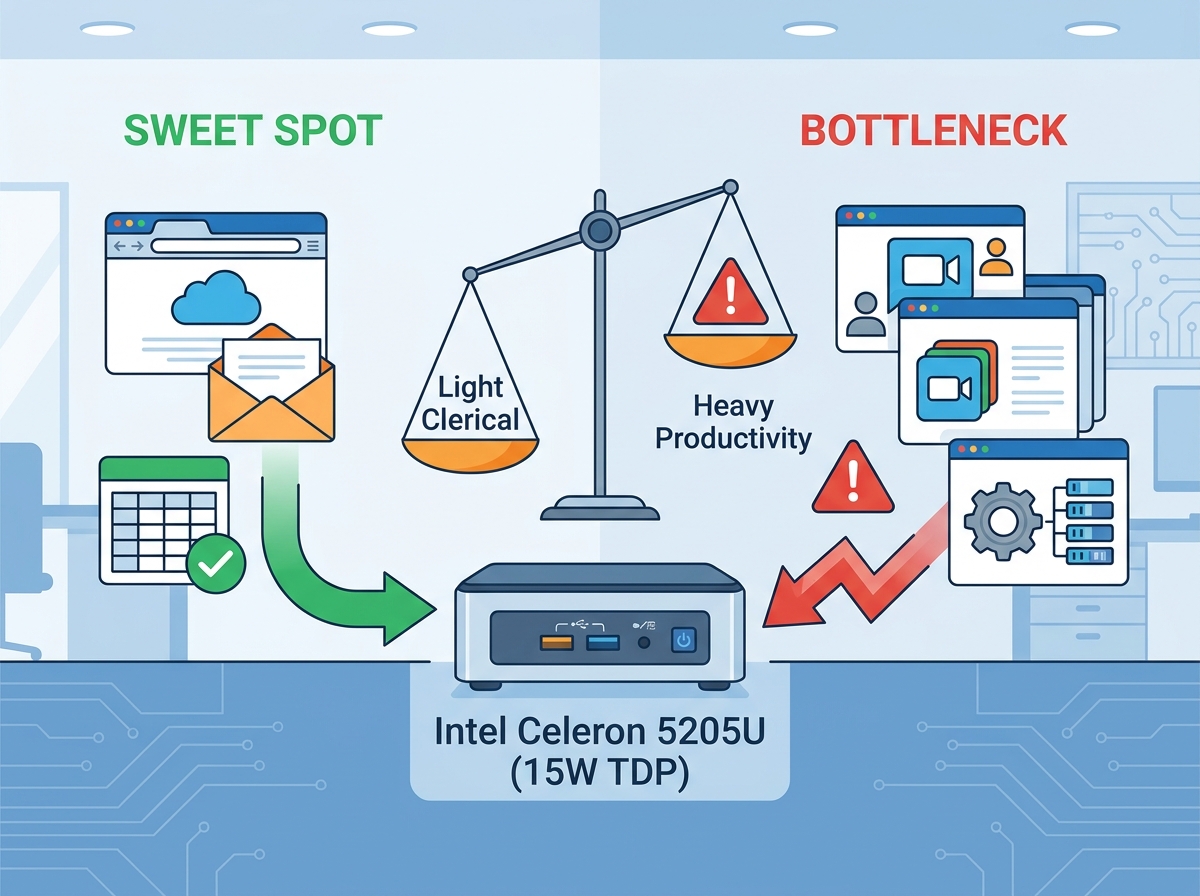
We often use the term "office work" far too broadly. It covers everything from writing short emails to rendering complex 3D graphics. You must differentiate between light clerical tasks and heavy productivity. This essential distinction sets realistic performance expectations for budget hardware.
Low-intensity scenarios represent the ultimate sweet spot here. A budget mini PC excels at managing basic email inboxes. It handles browser-based CRM data entry beautifully. You can utilize it reliably for digital signage displays. It also runs front-desk reception terminals perfectly. These specific jobs require minimal processing power. They rely mostly on stable internet connections. The processor rests comfortably during these undemanding activities.
High-intensity scenarios create immediate, frustrating bottlenecks. You might attempt running multiple Electron-based applications simultaneously. Applications like Teams, Slack, and Zoom consume significant system memory. Heavy multitasking will freeze an entry-level processor quickly. Macro-heavy Excel sheets will also cause severe system stuttering. A financial analyst would experience unacceptable delays using this hardware. Background tasks like Windows Updates will drag active performance down further.
We need a clear, objective success metric for deployment. A successful desktop replacement must deliver absolutely zero input lag. Primary tasks must respond instantly to mouse clicks. The machine must also maintain reliable thermal stability. It needs to survive a full eight-hour shift smoothly. If an employee waits three seconds for a document to open, the hardware fails the test.
We must translate raw specifications into real-world business outcomes. The Intel Celeron 5205U features a 1.9GHz base clock speed. It offers exactly two processing cores and two threads. The chip operates on a strict 15-watt power limit. This specific architecture prioritizes extreme power efficiency. It favors low heat output over raw, aggressive speed. You cannot expect workstation-level processing from this silicon.
The processor alone does not dictate overall system speed. RAM and storage choices play equally critical roles. We advise buyers to avoid specific configurations entirely. You should never buy models featuring merely 4GB of RAM. You must also avoid slow eMMC storage drives. These subpar components cripple modern operating systems instantly. An Intel Celeron 5205U mini PC requires specific baseline upgrades. Eight gigabytes of RAM is absolutely non-negotiable today. Fast NVMe or SATA SSDs are strictly required. These superior components ensure a viable Windows 10 or 11 experience.
Connectivity also matters deeply for office environments. You must evaluate typical input and output setups before buying. Dual HDMI ports gracefully support dual-monitor configurations. Gigabit Ethernet provides highly stable, wired network connections. USB 3.0 ports handle modern desktop peripherals easily. These physical connections support modern desk setups efficiently. A well-equipped unit prevents the need for messy USB hubs.
Hardware Component | Avoid Buying | Strictly Required Baseline |
|---|---|---|
System RAM | 4GB | 8GB or 12GB |
Primary Storage | 64GB / 128GB eMMC | 256GB SATA or NVMe SSD |
Display Output | Single VGA / HDMI 1.4 | Dual HDMI 2.0 (For 1080p setups) |
Networking | Wi-Fi 4 / 100Mbps LAN | Gigabit Ethernet + Dual-Band Wi-Fi |
Form factor changes how we physically organize our workspaces. You can utilize built-in VESA mount capabilities easily. You simply attach the small PC directly behind a monitor. This hidden setup creates a clean, zero-footprint desk environment. Employees gain much more physical space for offline paperwork. Cable management becomes significantly simpler and visually cleaner. You remove the massive metal tower from the floor entirely.
Power consumption differences remain massive between these formats. The Celeron 5205U draws a mere 15 watts under load. A traditional desktop CPU often pulls 65 watts or more. You can calculate potential energy savings quickly for your building. An office running fifty units continuously saves significant electricity monthly. This profound efficiency reduces your direct utility bills. It also dramatically lowers the ambient heat inside small office spaces. Your air conditioning system works less intensely during summer months.
We must acknowledge a major, unavoidable desktop advantage. Traditional computer towers offer vast, flexible upgradeability. Mini PCs have strict, permanent physical limitations. You might upgrade the RAM and storage eventually. However, the internal CPU remains permanently soldered in place. Manufacturers utilize a standard BGA surface mount process. You cannot physically swap the processor later. When the processing chip becomes obsolete, you must discard the entire unit.
Cheap mini PCs carry specific, documented implementation risks. Community forums frequently discuss severe thermal throttling complaints. Ultra-compact chassis designs often feature highly inadequate cooling solutions. High internal temperatures lead directly to premature hardware failure. Sustained workloads will degrade the internal motherboard components rapidly. You might hear tiny, high-pitched cooling fans struggling loudly. This noise creates an annoying distraction in quiet office environments.
Security and compliance gaps pose another major corporate challenge. Enterprise IT buyers require specific fleet management features. These budget devices lack advanced hardware-level security protocols. They do not support remote IT management tools natively. You will not find advanced Intel vPro technology here. If a system crashes completely, IT cannot reboot it remotely. A technician must physically walk to the broken machine. This physical requirement frustrates large IT departments deeply.
Vendor reliability requires careful, meticulous scrutiny from buyers. You must exercise extreme caution when sourcing hardware. Many unbranded white-label units currently flood massive online marketplaces. We highly advise investigating the manufacturer's actual reputation beforehand.
Here are vital deployment checks for your IT purchasing team:
Verify the manufacturer warranty terms directly on their official website.
Confirm BIOS update availability through an accessible online support portal.
Validate all operating system licensing legitimacy thoroughly upon arrival.
Test one single sample unit extensively before placing bulk orders.
Monitor chassis temperatures actively during initial software stress tests.
You need clear, unambiguous rules for purchasing decisions. Let us categorize the ideal usage scenarios clearly. This framework prevents costly hardware misallocations across different departments.
Buy If:
You need a strictly single-purpose hardware machine.
The employee role involves basic web terminals or information kiosks.
You face incredibly strict physical spatial constraints at the desk.
Your hardware budget securely falls under $200 per station.
The environment relies entirely on lightweight cloud-based applications.
Pass If:
The daily role requires heavy, continuous video conferencing sessions.
Employees process large, complex macro-enabled spreadsheets daily.
You are currently outfitting a dedicated power-user or creative professional.
The specific user's hourly time holds significantly more value than hardware savings.
Your IT department mandates hardware-level remote desktop management tools.
You must take a critical next-step action immediately. We highly recommend auditing employee workflows first. Analyze their specific daily software stack carefully. Identify exactly which programs run simultaneously during peak hours. Do this necessary research before finalizing any bulk hardware purchase. Proper research guarantees smooth daily operations.
The Intel Celeron 5205U mini PC serves a specific, narrow purpose. It operates primarily as a highly specialized administrative tool. You should never view it as a universal desktop replacement. We clearly see its physical and processing boundaries now.
When deployed correctly, it offers absolutely unbeatable value. Low-demand, single-task environments allow this hardware to truly shine. Misapplying it to heavy, multitasking workloads causes intense workflow friction. This daily operational friction destroys any initial hardware savings entirely.
Follow these concise, action-oriented next steps for your office:
Audit your current departmental software usage clearly and honestly.
Purchase a single evaluation unit before authorizing massive bulk orders.
Standardize your mandatory 8GB or 12GB RAM and SSD requirement strictly.
Ensure all newly chosen office monitors support standard VESA mounting.
A: Yes, it typically supports them via dual HDMI or HDMI/Type-C ports. However, running two 4K displays will severely stress the integrated UHD Graphics. Stick strictly to 1080p monitors for smooth, reliable daily office performance.
A: It handles basic one-on-one video calls adequately. However, running large gallery views with active screen sharing, while other applications remain open, will cause noticeable system lag. Keep background tasks closed during important meetings.
A: No. The processor is permanently soldered directly to the motherboard. Only the system RAM and storage drives can be physically swapped. This limitation strictly depends on your specific chassis design.