Views: 0 Author: Site Editor Publish Time: 2026-08-03 Origin: Site
The appeal of ultra-budget compact computers is undeniable for home offices and small business deployments. Buyers love the tiny footprint and immediate savings. However, purchasing the wrong hardware creates hidden productivity costs down the line. The Intel Celeron N4500 is a highly affordable, low-power processor. You frequently find this 6W chip powering sub-$150 machines targeted at basic computing tasks.
While an intel n4500 mini pc looks like an absolute steal on paper, buyers face a strict reality check. You must realistically map its two-core architecture against your daily software stack. Hardware limitations become obvious during demanding tasks. This guide breaks down exactly where the N4500 excels and where it hits inevitable performance bottlenecks. We will show you how to objectively evaluate if this chip meets your modern office criteria.
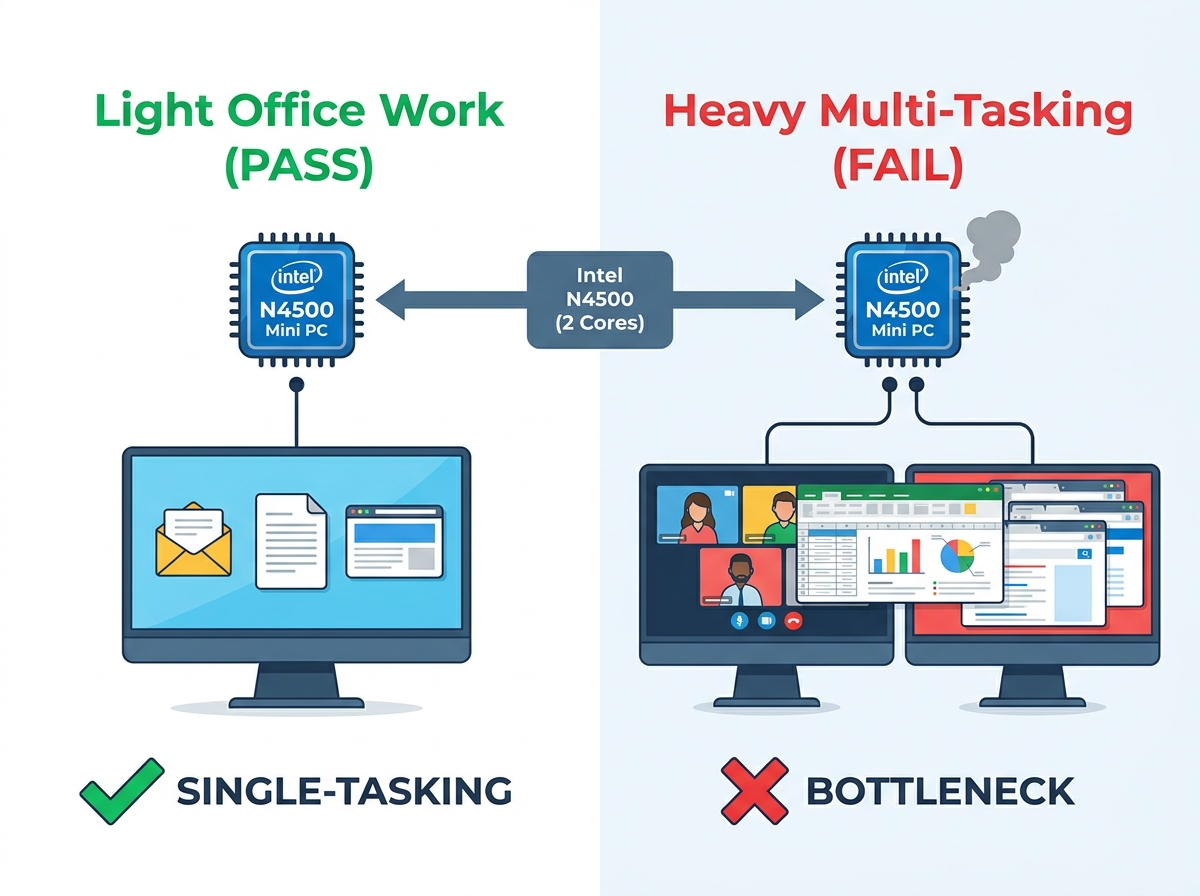
Best Use Case: Perfectly capable for single-tasking administrative roles, reception desks, digital signage, and basic web-based data entry.
The Hard Limit: With only two cores, it will struggle under heavy multi-tasking (e.g., running Zoom, multiple heavy Excel sheets, and a dozen Chrome tabs simultaneously).
Hardware Dependency: An N4500 chip is only viable for office work if paired with at least 8GB of RAM and a true SSD (avoiding 4GB models and eMMC storage).
The Upgrade Path: For users needing more robust multitasking capability, stepping up slightly to an Intel N100 or N95 processor often provides significantly better ROI.
People often use the term "everyday office work" loosely. We must define it clearly to evaluate hardware effectively. IT professionals typically divide office users into specific categories. Establishing a strict baseline helps measure system viability accurately before you buy.
The "Light Admin" versus "Power User" framework clarifies these boundaries. The Light Admin represents users who focus on sequential tasks. They open one application, finish a task, and move to the next. They rarely push hardware to its absolute limits. Conversely, the Power User framework describes employees running complex software simultaneously. They demand rapid context switching between heavy applications.
You must pass or fail hardware based on these distinct workloads.
Basic workloads pass the N4500 test effortlessly. We classify basic workloads as lightweight, single-focus activities. These tasks include navigating Google Workspace or Microsoft 365 web applications. You can view basic PDF files and edit simple text documents without issue. Light email management via web browsers works perfectly. Running internal chat applications like Slack or Microsoft Teams also falls into this category. The dual-core processor handles these sequential operations smoothly.
Moderate to heavy workloads will cause the N4500 to struggle or fail completely. You cannot throw complex calculations at this processor. Large Excel workbooks containing complex macros or dynamic pivot tables will freeze the system. Active screen-sharing during high-definition video calls creates a massive bottleneck, especially when manipulating local files simultaneously. Browser-heavy workflows also cripple the machine. Leaving twenty active tabs open while loading JavaScript-heavy Customer Relationship Management (CRM) tools brings the system to a crawl.
User Category | Typical Software Stack | N4500 Suitability |
|---|---|---|
Light Admin / Reception | Web browser (1-3 tabs), Word, basic email client | Pass (Excellent Fit) |
Standard Knowledge Worker | Chrome (10+ tabs), Slack, Zoom, Excel | Struggle (Expect Lag) |
Power User / Analyst | Heavy CRM, Large databases, multi-app screen sharing | Fail (Severe Bottlenecks) |
Let us look closely at the silicon inside an intel n4500 mini pc. Buyers must understand the technical specifications before committing to a bulk purchase. The N4500 relies on the Jasper Lake 10nm microarchitecture. This specific design features just two processing cores and two threads. You should set realistic performance expectations immediately upon purchase. This chip remains an entry-level mobile processor designed for extreme power efficiency. It absolutely does not compete against desktop-class Core i3 or Core i5 central processing units.
You do gain significant environmental benefits from this architecture. In real-world deployments, users notice its power efficiency immediately. The processor operates at a remarkably low 6W Thermal Design Power rating. This minimal heat generation offers a massive operational benefit for dense office layouts. Manufacturers can build these computers using passive cooling systems. Fanless designs operate silently. They eliminate distracting office noise entirely. Fanless chassis designs also prevent dust accumulation inside the delicate internal components. This specific physical advantage extends hardware lifespan significantly in industrial or dusty warehouse environments.
Modern office work also requires solid display connectivity. The N4500 handles video output surprisingly well for its price bracket. You can run a standard dual-monitor setup effortlessly. The integrated Intel UHD graphics support 4K resolution at a smooth 60Hz refresh rate. It also includes built-in hardware decoding for modern media formats. This built-in feature ensures smooth video playback during corporate training modules. It works perfectly for looping high-definition digital signage. You get excellent display capabilities without needing a dedicated graphics card.
Hardware limits become glaringly obvious when you push beyond basic workflows. You will inevitably encounter the 100% CPU utilization problem during intense sessions. A dual-core processor maxes out quickly under concurrent software loads. This specific bottleneck leads to noticeable input lag and frustrating system freezing. You might experience dropped video frames or robotic audio during critical Zoom conferences. Single-tasking works fine. Heavy multitasking instantly breaks the illusion of desktop speed.
Here are common scenarios where the processor maxes out:
Exporting a large PDF while actively joining a video conference.
Running a heavy Excel macro while downloading background Windows updates.
Switching rapidly between a local accounting app and a heavy web-based dashboard.
We often see buyers fall into the dreaded RAM and Chrome trap. Modern web browsers consume massive amounts of processing power. They rely heavily on memory caching for smooth operation. Deploying underpowered hardware to remote workers poses a massive productivity risk. These specific employees rely on complex Software as a Service platforms daily. Tools like Salesforce or HubSpot demand significant client-side resources. The dual-core processor struggles to process heavy JavaScript loads across multiple active tabs. Once the physical memory fills up, the system pages data to the storage drive. This action slows the entire computer down to a crawl.
You must also account for mandatory enterprise security overhead. Background tasks required by enterprise IT departments eat into limited system resources continuously. Active antivirus scans consume precious CPU cycles. Running corporate VPN clients requires constant encryption overhead. Endpoint management tools monitor system health constantly in the background. These necessary compliance protocols can cripple a two-core machine. You must calculate these hidden software loads before finalizing your hardware deployment strategy.
Buying ultra-budget hardware requires strict component discipline. You must avoid the "eMMC storage plus 4GB RAM" trap entirely. Manufacturers often sell these ultra-cheap configurations just to hit rock-bottom retail price points. However, 4GB of memory remains completely insufficient for modern office environments. Windows 11 alone consumes nearly half of that allocation immediately upon boot. You will face constant system paging. The machine will feel unresponsive within hours of use.
Your shortlisting criteria must mandate specific hardware minimums. Memory capacity directly dictates your multitasking headroom. We recommend 8GB of DDR4 RAM as the absolute non-negotiable baseline. Upgrading to 16GB provides essential breathing room for modern browser tabs and background applications.
Storage speed impacts system responsiveness more than almost any other component. You must insist on a SATA SSD or NVMe M.2 drive format. You must avoid eMMC modules completely. eMMC storage performs poorly. It mimics the speed of cheap SD cards. This slow flash memory degrades overall system speed rapidly over time. True solid-state drives provide the fast random read and write speeds necessary for Windows 11.
Finally, consider the operating system requirements carefully. Ensure the machine ships with Windows 11 Pro if you plan to join a corporate network. Standard Home editions lack essential domain-join capabilities. They also lack BitLocker encryption support. These features remain mandatory for most business network environments.
Smart buyers evaluate hardware lifecycles and future scalability. A $120 dual-core system might save immediate capital today. However, you must project its usable lifespan realistically. Business software needs evolve rapidly. Operating system updates become heavier every single year.
Upgrading to a slightly more expensive N100 model often makes better long-term sense. The newer N100 features four physical processing cores. It delivers roughly double the multi-core processing performance. This strategic upgrade dramatically extends the hardware lifecycle. You avoid replacing sluggish machines prematurely. The minimal upfront price difference yields a much longer useful lifespan.
We recommend buying an intel n4500 mini pc only for strict, targeted use cases. It fits perfectly into non-critical workstation environments. You can deploy them efficiently as warehouse inventory terminals. They work beautifully for front-desk check-in kiosks. They serve excellently as simple digital signage players. These highly isolated tasks rarely trigger the multitasking bottleneck.
Knowledge workers require more robust solutions. If your primary employees heavily manipulate data, you must pivot your strategy. If they run intensive CRM platforms alongside video calls, they need better hardware. We highly recommend looking into Intel Alder Lake-N processors for these users. Chips like the Intel N100 or N95 offer superior daily performance. You might also explore entry-level AMD Ryzen 3 or Ryzen 5 compact computers. They provide exceptional multitasking capabilities for demanding office personnel.
The Intel Celeron N4500 serves a highly specific purpose in the enterprise hardware landscape. It delivers an adequate, cost-effective solution for strict, light-duty tasks. However, it simply cannot function as a heavy "do-it-all" desktop replacement. You must recognize its physical limitations early to avoid widespread deployment regrets.
Before purchasing, audit your daily software usage thoroughly. Open your heaviest daily applications. Check your current RAM and CPU utilization in the Windows Task Manager. If your current machine regularly exceeds 40% CPU usage on basic tasks, a dual-core replacement will definitely bottleneck your productivity.
Always prioritize configurations featuring at least 8GB of RAM and true SSD storage. Finally, restrict these dual-core machines strictly to single-app kiosk or receptionist roles. Make informed deployment decisions to protect your team's workflow efficiency.
A: Yes, it meets the hardware requirements for Windows 11. However, smooth performance demands strict configuration limits. You need a minimum of 8GB of RAM and a dedicated SSD to prevent OS-level lag.
A: No. The N4500 lacks the necessary multi-core processing power. It also lacks the robust GPU required for Adobe Creative Cloud applications. You cannot use it for heavy media rendering or professional graphic design tasks.
A: Yes. Most modern configurations support dual 4K displays operating at 60Hz. This capability makes them perfectly fine for side-by-side document editing, basic web browsing, and comparing data across two screens.
A: The N100 is vastly superior for demanding business environments. It features four processing cores compared to the N4500’s two. This architectural advantage handles multi-tasking much better for a very small price increase.